Open the practice with a double-click at level 4 or 5. The moving and copying are under Where it sits, at the foot of its record.
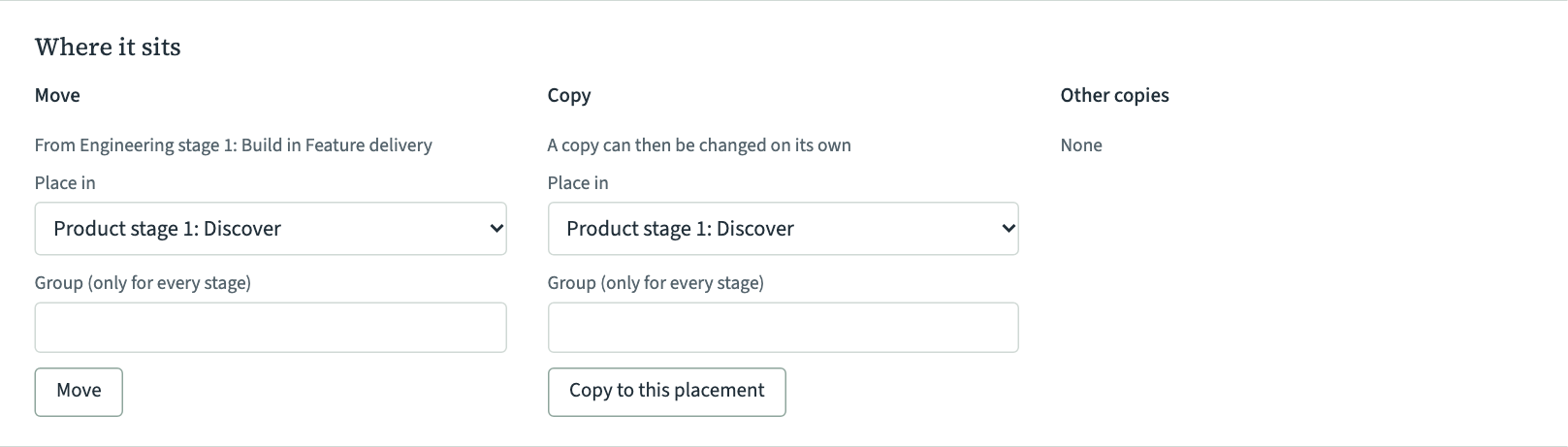
Move it to another stage
- Under Move, the line under the heading says where the practice is now.
- In Place in, choose a stage, a band, or Runs through every stage. Only places in the same value stream are offered.
- For Runs through every stage, type the row's name in Group (only for every stage), or leave it empty.
- Choose Move.
The practice keeps its record and its relations. Its place on the maturity map goes with it, so check the new stage's maturity map.
If the practice sits in more than one place, Move moves the first place listed under its name.
Copy it
A copy is a new practice with the same text, kind, family, teams and shared items, placed where you choose. After that the two are separate, and a change to one does not change the other. Copy a practice when another stage does much the same thing in its own way.
- Under Copy, choose the place in Place in, and a group name if it runs through every stage.
- Choose Copy to this placement.
The copy has no relations. Both practices list each other under Other copies.
One practice in more than one place
Sometimes one practice really is the same event in two places, such as a weekly priorities meeting that decides the work for two value streams. VSTA can show one practice in more than one place. Its record lists every place under its name, each with its own maturity, and its card at level 5 says "Also in" and the other value stream.
You cannot add a second place for a practice in VSTA's own screens yet. A facilitator can ask Claude to add one. Otherwise, copy the practice.
Take it out of one place
In edit mode, click the practice's card in the place you want it gone from, and press Delete. If the practice sits somewhere else too, only this card goes. The practice, its other places and its relations stay.
Delete it
- In the practice's record, choose Delete this practice at the foot.
- VSTA asks first. It says how many relations go with it and, if the practice sits in more than one place, lists them all.
- Choose Delete practice, or Keep it to go back.
In edit mode, selecting the practice's last card and pressing Delete also deletes it, without asking. Deleting cannot be undone.