From level 2, hold the pointer over a stage, a band or a value stream's name. A small Details button appears. Choose it to open the details in a dialog over the map.
A stage
A stage is one step in a value stream. Its number on the map gives its order. Two stages that run at the same time share a number with a letter, such as 2a and 2b.
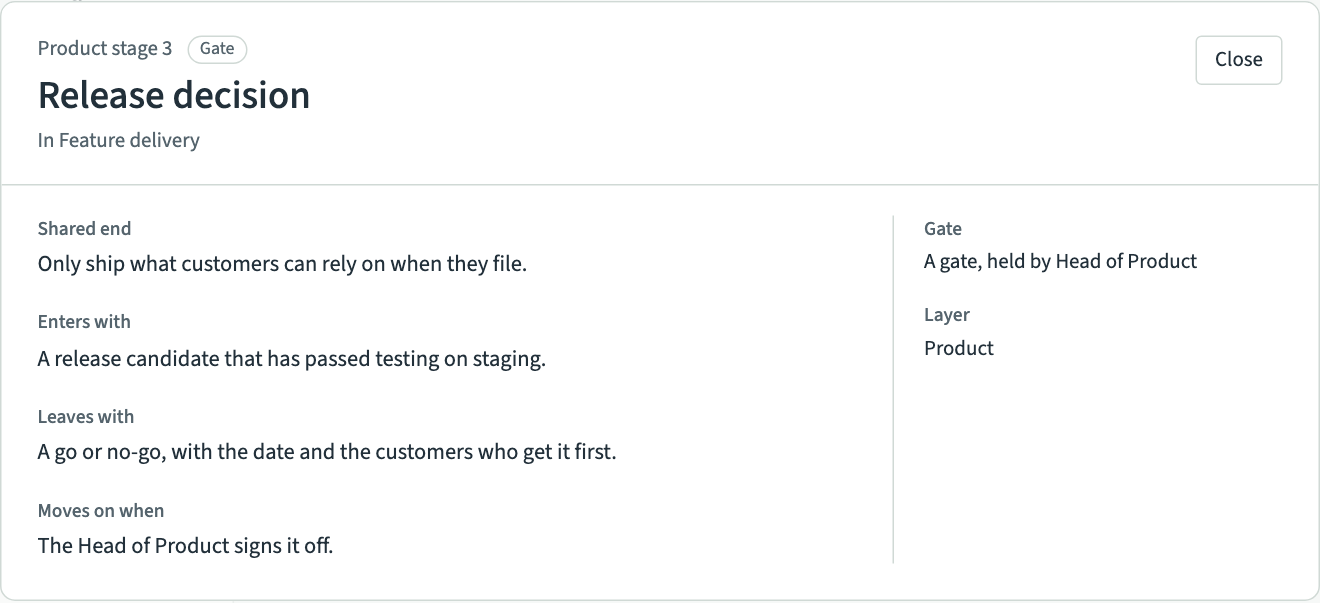
A stage's details are:
- Shared end, what everyone in the stage is working towards;
- Enters with, what the work looks like when it arrives;
- Leaves with, what it looks like when it goes on to the next stage;
- Moves on when, what has to be true before it moves on;
- Gate, whether the stage is a gate, where someone decides whether the work goes on, and which role holds it;
- Layer, the layer the stage sits in.
Layers
A value stream can have more than one layer, such as Product and Engineering, drawn as rows with their names running up the left side. Each layer has its own stages in order. A value stream with one layer shows its name the same way.
Bands alongside stages
A band is a strip under some of a layer's stages. It holds practices that run alongside those stages, such as the work to keep up with a tax authority's changes while features are built. Its details give its description and list its practices.
Rows that run through every stage
The rows at the foot of a value stream hold practices that run through every stage, such as a team's stand-up. Each row has a name, such as "Team rhythm", or none. These rows have no details of their own.
A value stream
A value stream's details give its description and each layer with its stages in order. Choose a stage there to glide to it.
Choose Close or press Escape to close the dialog.